
Corporate websites aren't what we usually build. idPowers works on more complex products: web services, mobile apps, automation, scrapers, and internal systems.
But an agency needs a corporate site of its own — it's how clients understand what we do and what to come to us with.
Building a corporate website is a task we normally handle for clients alongside larger projects. This time, the client was us.
The previous version of our site ran on WordPress for about four years. It had aged, become awkward to maintain, and its structure and content no longer fully matched what we do today.
Normally this kicks off the standard process: a designer, a developer, an SEO specialist, a copywriter, approvals, revisions, and several weeks or even months of work.
We wanted to know how far AI could compress that process — and to test the approach on our own project before offering it to clients.
In a few days, we ended up doing all of this:
- built a new corporate website;
- assembled a semantic core;
- collected around 4,500 relevant search queries;
- automatically grouped them into 687 clusters;
- designed the structure of the future pages;
- prepared SEO briefs for the content;
- wrote and published the texts.
Without a separate designer, SEO specialist, copywriter, or development team.
By my estimate, this approach saved us at least $2,000.
Here's how the process actually works.
Why the work didn't start with design
One of the common mistakes in corporate website development is drawing the structure and pages first, then thinking about SEO. Building a company website starts not with a mockup, but with understanding demand.
Before development, you need to know which queries potential clients actually use to look for your services.
Say a company does website maintenance. A user might search for:
- website technical support;
- website maintenance;
- full-service site support;
- technical support pricing;
- website upkeep.
Some of these can share a single page. Others need their own landing page. Informational queries are better sent to the blog entirely.
So you collect the semantic core first, cluster the queries, and only then design a real site structure.
We automated nearly all of this.
Step 1. Identify the company's services
For this we built an internal service that runs on Claude.
At the first stage, it receives the company's website. The AI analyzes it and determines which services the business provides.
For idPowers, for instance, it found:
- MVP development;
- mobile development;
- Python development;
- business process automation;
- scraper development;
- technical support;
- analytics systems development.
You can also point it at competitors' sites. Claude analyzes those and suggests services and directions that might be missing from your own site.
After that, all that's left is checking the list by hand: removing what the company doesn't do, and adding what's missing.
This list becomes the foundation of the semantic core.
Step 2. Generate seed phrases
For each service, the AI produces a set of base search phrases — seed queries.
For MVP development, those might be:
- MVP development;
- building an MVP;
- MVP for a startup;
- turnkey MVP development;
- MVP development cost;
- what is an MVP.
At this stage we still don't know the real search volume. These are just hypotheses about what a potential client might type.
The next step is checking them against real data.
Step 3. Pull queries from Yandex Wordstat
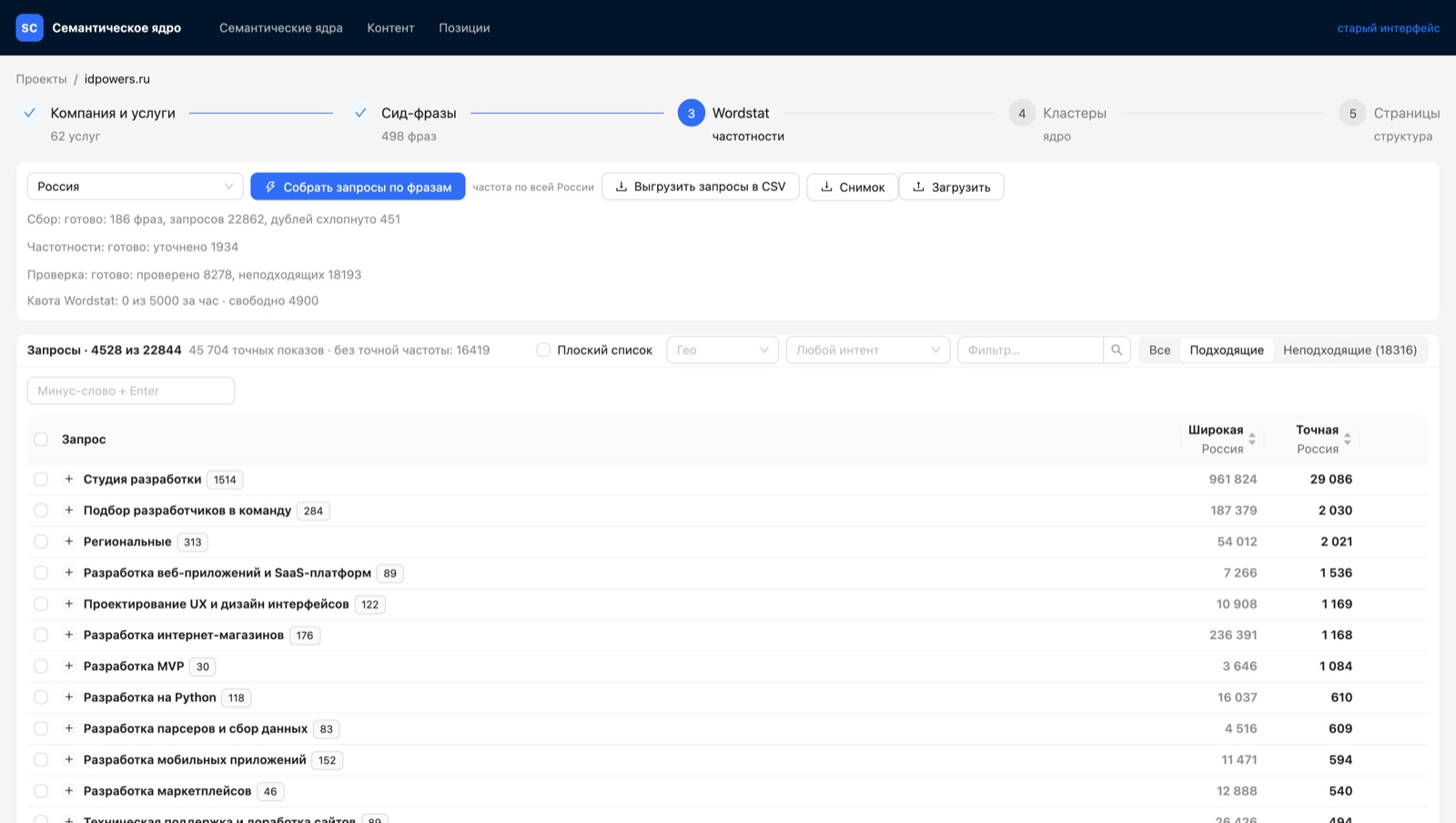
We connected the Yandex Wordstat API — Yandex's search statistics service, roughly the local equivalent of Google Keyword Planner. Our service sends the seed phrases there and gets back related search queries along with their volume.
In our case, Wordstat initially found almost 23,000 queries.
Most of that semantics turned out to be irrelevant.
If the word "outsourcing" shows up, for example, Wordstat may return queries about accounting outsourcing. Those have nothing to do with our services.
So the next stage has Claude analyze the collected queries and strip out the junk.
Around 18,000 queries were automatically rejected in our case.
One detail that matters: the system doesn't just flag a query as irrelevant — it explains why. "The user is looking for a job, not a contractor." "Looking for a free solution." "Someone else's brand." That lets you check the logic quickly and pull back anything you disagree with.
What remained was roughly 4,500 relevant queries the site could realistically rank for.
Step 4. Cluster the semantic core
Getting a few thousand keywords isn't enough on its own.
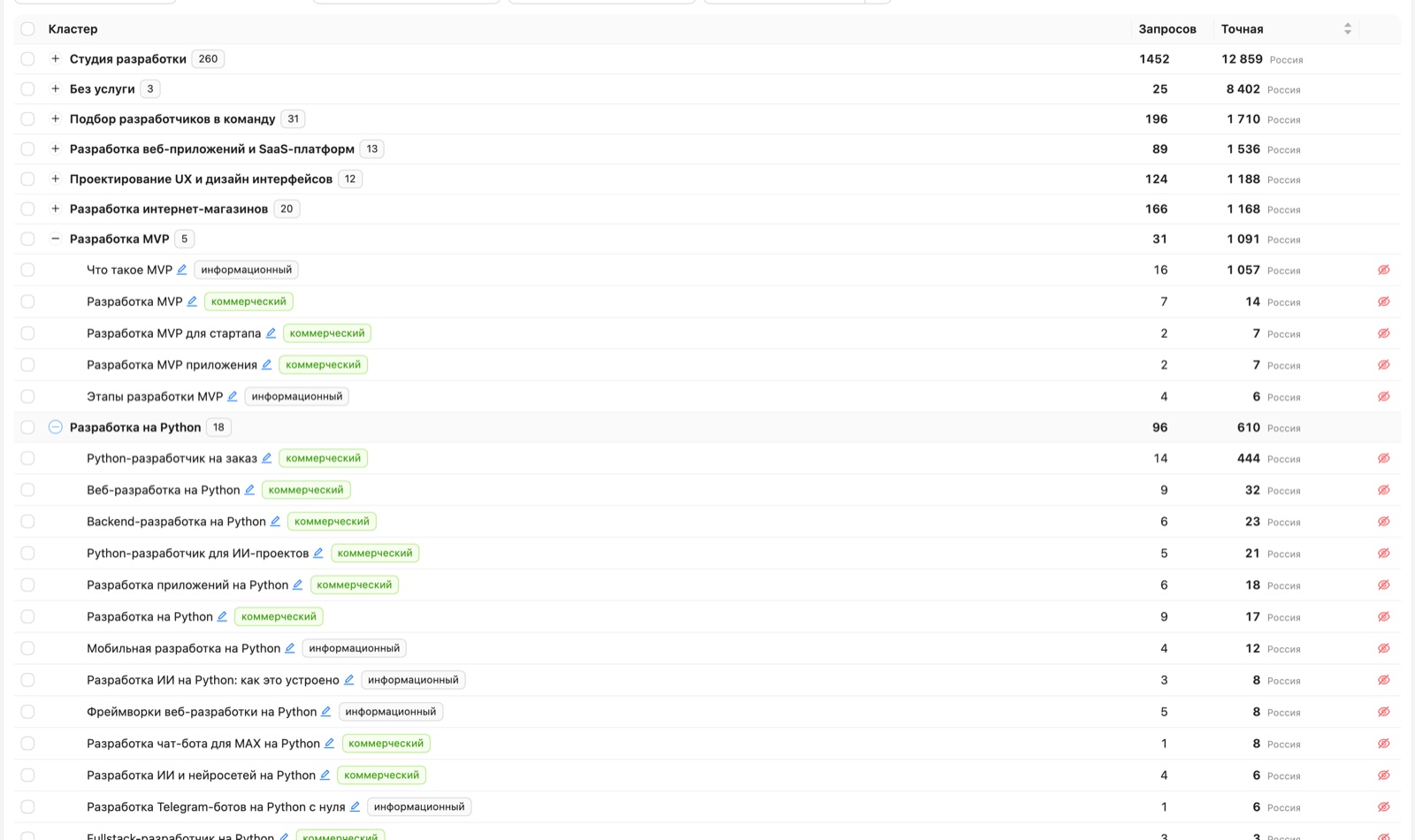
You need to know which ones belong to the same topic and can be promoted on a single page. That's what clustering is for.
Queries like:
- MVP development for a startup;
- MVP for a startup;
may belong to one commercial cluster.
While queries like:
- what is an MVP;
- what does MVP mean;
- MVP explained simply;
form an informational cluster instead.
In our case, the system produced 687 clusters out of roughly 4,500 queries.
Claude did most of this automatically. My job was to review the results periodically and remove queries or groups that clearly didn't match the company's services.
Step 5. Turn clusters into a site structure
After clustering comes what I consider the most valuable part of the process.
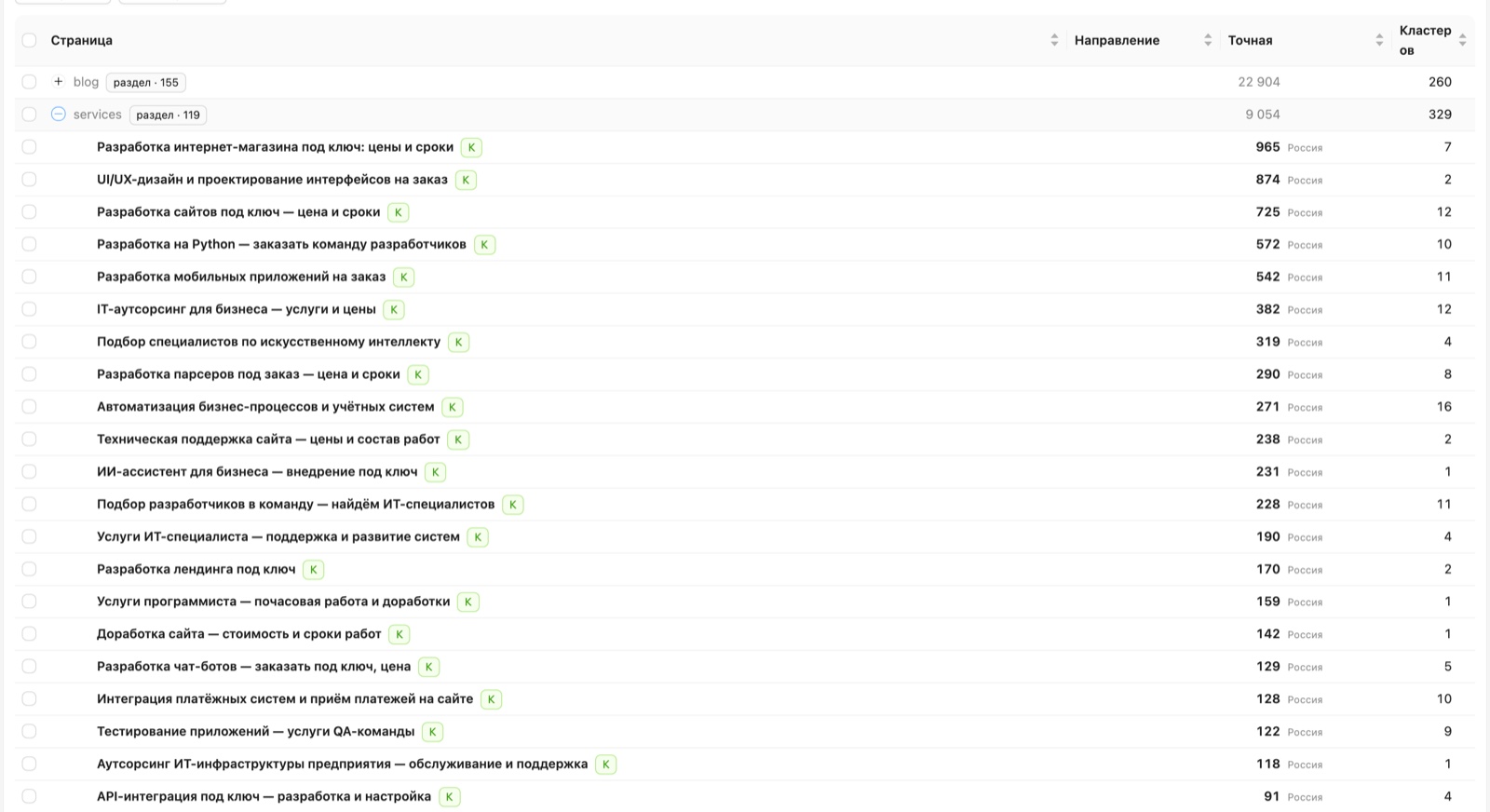
The AI proposes which pages need to exist to cover the demand it found. The logic is simple enough: commercial queries go to service pages, informational ones go to blog articles.
For the technical support page, for example, the system merged several commercial clusters and calculated the combined search demand across them.
Instead of a site structure invented off the top of someone's head, you get one grounded in what users actually search for.
This is where AI is especially useful: manually sorting through several thousand queries and deciding which ones belong to the same page is fairly monotonous work.
How finished pages get checked
The automation doesn't stop there.
Another tool compares the content of a finished page against the semantic core. It shows which important words and topics the text already covers, and which ones it hasn't touched yet.
For one of the technical support pages, the system found coverage of 25 out of 34 target keywords.
That doesn't mean the remaining nine should be mechanically stuffed into the text. That's exactly what you shouldn't do.
A few years ago, sites often carried a separate SEO block packed with keywords. The task today is entirely different: cover the page's topic naturally while using the right search vocabulary where it genuinely fits.
So the system works as a checklist, not as an SEO spam generator.
How AI helps write the content
For each page, the service additionally analyzes the search results. It looks at the pages already ranking for the target queries, along with their structure and content.
From that it builds a brief for the text:
- which topics need to be covered;
- which headings to use;
- which user questions to answer;
- which keywords are worth including;
- what structure the competitors in the search results use.
We hand that brief to ChatGPT.
ChatGPT produces a first draft, and then the text gets edited by hand: cutting the filler, reworking phrasing, adding the specifics of the company, and making sure it doesn't turn into the usual SEO wall of text.
How content reaches the site without a CMS
The new idPowers site has no familiar admin panel like WordPress.
When a text is ready, we pass it to Claude and specify which page and which blocks it belongs in. Claude edits the site's code.
A developer then reviews the result and adjusts individual blocks where needed.
So the chain looks roughly like this:
semantics → structure → SEO brief → text → editing → publishing.
And at most of those stages, AI handles a significant share of the routine work.
What came out of it
The core process took about 3–4 days. In that time we managed to:
- completely rebuild the corporate site;
- define the list of services;
- analyze search demand;
- process around 23,000 discovered queries;
- filter out irrelevant semantics;
- end up with roughly 4,500 target queries;
- group them into 687 clusters;
- design the structure of commercial and informational pages;
- prepare the SEO briefs;
- write and publish the main content.
Previously, a project like this would have required developers, a designer, an SEO specialist, and a copywriter.
Even a relatively small corporate site could easily start at $2,000, with development stretching across weeks or months.
With AI, one person can now handle a significant part of that process.
What comes next: from structure to promotion
A finished structure is half the work. Then SEO begins in earnest: pages need to be indexed, positions tracked, and the content refined based on what actually happens.
We stick to a simple rule here: demand first, then pages, and only then external factors. Development that starts with semantics saves the most at this stage — you don't end up retrofitting the structure for queries nobody thought about at the start.
SEO for a development studio works differently than it does for an online store: fewer queries, each one more valuable, and almost every one leading to a specific service page. Which makes the page map matter more than the volume of content.
Does this mean specialists are no longer needed
No.
AI is very good at cutting down manual work, but the result still has to be supervised.
Claude can misidentify a service or merge queries incorrectly. Wordstat contains an enormous amount of noise. ChatGPT can write a formally correct but meaningless piece of marketing copy.
So the human role is gradually shifting. Instead of performing every small operation directly, a person:
- sets the direction;
- defines the criteria;
- checks the result;
- fixes the mistakes;
- makes the final decisions.
That's exactly what makes development several times faster.
The main takeaway
What's interesting right now isn't simply using ChatGPT or Claude in place of a copywriter or a programmer.
The bigger effect appears when AI becomes part of an entire process.
A few years ago, assembling the semantics, designing a site structure, and writing the texts for it would have taken several specialists and several weeks. Today a significant part of that work can be automated and done in a few days.